How to build an app with AI: a 2026 walkthrough

To build an app with AI in 2026, you pick the right AI tool for the job, describe what you want in plain language, let it generate a working first version, then steer it with tight feedback until it ships. The short version: write a one-paragraph spec, generate the app with an AI builder, connect a database and auth, test the real user flow, and deploy. What used to take a small team a month, one person can now do in a weekend.
I have shipped real products this way, so this is a concrete idea-to-shipped walkthrough, not a demo. If you want the wider strategic picture of building software this way, read the build an app with AI guide. This post is the step-by-step.
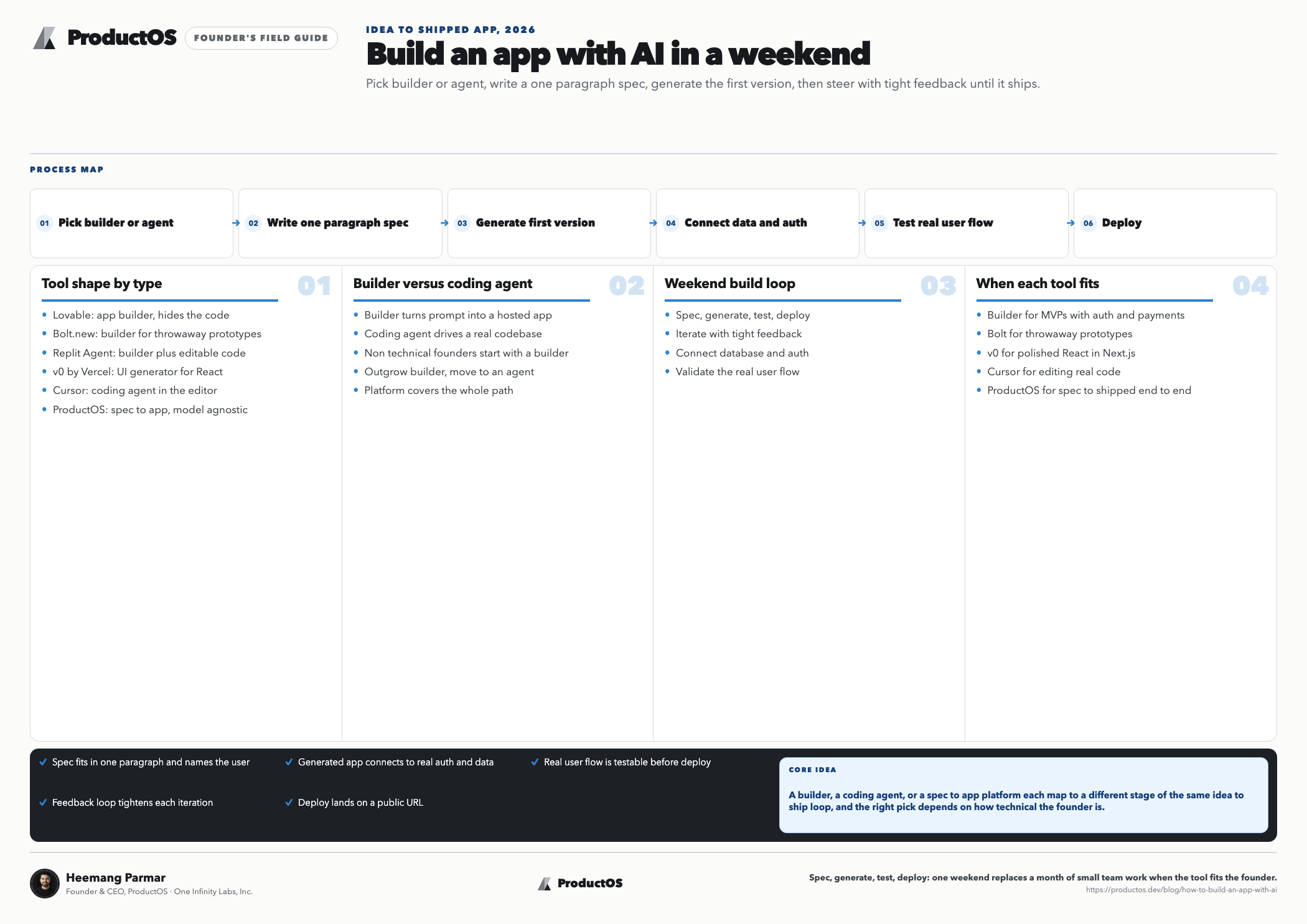
How to build an app with AI: builder vs coding agent
Before the steps, one decision shapes everything: are you using an AI app builder or a coding agent? A builder like Lovable or Bolt turns a prompt into a hosted app and hides the code. A coding agent like Claude Code or Cursor drives a real codebase in your editor and hands you the code. Non-technical founders should start with a builder. If you know some code, or you outgrow the builder, move to an agent. There is also a third shape worth knowing: a platform like ProductOS covers the whole path from a written spec and design through to a shipped app, is model-agnostic so you build with Claude, GPT, or Gemini, and has a free Hobby tier to start.
| Tool | Type | Best for | Starting price |
|---|---|---|---|
| ProductOS | Spec-to-app platform | Taking an idea from spec and design to a shipped app | Free Hobby tier; Pro $20/mo |
| Lovable | App builder | Shipping a real SaaS MVP with auth and payments | $20/mo |
| Bolt.new | App builder | Fast prototypes you will throw away | Free tier + paid |
| Replit Agent | Builder + IDE | Seeing and editing the generated code | Free tier + paid |
| v0 by Vercel | UI generator | Polished React components for a Next.js app | Free tier + paid |
| Cursor | Coding agent | Interactive editing of a real codebase | Free; Pro $20/mo |
| Claude Code | Coding agent | Autonomous multi-file work in the terminal | Paid plans |
For a full breakdown with free tiers and trade-offs, see best AI app builders. Prices are current as of mid-2026 and move often, so check before you commit.
How to build an app with AI in 7 steps
Write a one-paragraph spec before you touch a tool. Name the user, the one job the app does, and what a successful outcome looks like. Skip this and the AI will fill the gaps with its own guesses, which are rarely yours. You do not need a formal document to start, but if the app is real, a short product requirements document keeps the AI honest as scope grows.
Generate the first version from a clear prompt. Paste your spec into the builder and describe the core screen in detail: what the user sees, what they click, what happens. Ask for one feature, not ten. The first generation is a starting point, not the answer, so resist the urge to specify everything at once. Get one real flow working before you add anything.
Wire up data and auth early. An app with no database is a mockup. Most builders now connect to a Postgres backend and add login in a few clicks, so do it before you build more features, not after. Real data exposes the bugs a static prototype hides, and retrofitting auth into ten screens is far more painful than baking it into two.
Test the actual user flow, not the happy path in your head. Click through the app as a first-time user with no context. Sign up, do the core action, hit an empty state, enter bad input. This is where AI-built apps break most, because the model optimizes for the demo and skips the edges.
Iterate in small, specific prompts. When something is wrong, describe the exact change, not a vague vibe. “Move the submit button below the form and disable it until both fields are filled” beats “make the form better.” Small diffs are easy to review and easy to undo. Big rewrites hide new bugs inside the fix, which is the fastest way to lose an afternoon.
Graduate to a coding agent when you hit the wall. Every builder has a ceiling. When you need custom logic, a third-party integration, or performance the builder will not give you, export the code and open it in Cursor or Claude Code. This is not failure, it is the normal path. The builder gets you to a working app fast; the agent takes it the rest of the way.
Deploy, then watch what real users do. Ship it. Most builders deploy with one click, and a coding agent can push to Vercel for you. The app is not done at launch, it is barely started. Watch where users drop off, read the errors, and feed what you learn back into step five. Shipping is the start of the loop, not the end.
Where AI-built apps go wrong
The tools are good enough that the failure mode has shifted. It is rarely the AI writing broken code now. It is you giving it a fuzzy target and accepting the first plausible thing it returns.
Three traps catch most people. First, over-prompting: asking for the entire app in one shot, then drowning in a generation you cannot review. Build one flow at a time. Second, skipping the boring parts: auth, error states, and empty states are where products actually live, and the model will skip all three unless you ask. Third, trusting confidence over correctness. AI writes wrong code with the same tone as right code, so you still have to test.
The habit that separates people who ship from people who spin is treating the AI like a fast, literal junior developer. It does exactly what you say, including the parts you did not mean. Your job is the thinking: the spec, the priorities, and the judgment about what is good enough to ship. That mindset, giving AI sharp intent instead of vague hope, is the core of vibe coding done well rather than badly.
A realistic first project
If this is your first AI-built app, do not start with the SaaS you dream about. Build something with one user, one core action, and one screen: a habit tracker, a link-in-bio page, a small internal tool for your team. You will hit every step above at small scale, and then the ambitious project is just the same loop with more screens. The gap between an idea and a working app has never been smaller, but the hard part has not changed: knowing what to build and being honest about whether it works.
Frequently asked questions
Can I build an app with AI if I cannot code?
Yes. AI app builders like Lovable and Bolt are made for exactly this, turning plain-language prompts into working, hosted apps with no code required. You will still need to think clearly about what you want and test it carefully, but writing code is no longer the barrier. The real barrier is knowing what to build.
How long does it take to build an app with AI?
A simple, single-purpose app can go from idea to deployed in a weekend, sometimes an afternoon. A real product with auth, payments, and multiple screens takes longer, but weeks instead of the months a small team once needed. The generation is fast; the time goes into testing, iterating, and the judgment calls AI cannot make for you.
Should I use an AI app builder or a coding agent?
Start with a builder if you are non-technical or want speed, since it hides the code and deploys for you. Move to a coding agent like Cursor or Claude Code when you need custom logic, integrations, or performance the builder will not give. Many builders let you export the code, so you can start on a builder and graduate to an agent without starting over.
Is AI-generated code safe to ship?
It can be, but not on trust alone. AI writes plausible-looking code that is sometimes wrong, so you have to test the real user flow, check auth and data handling, and review anything touching security or payments. Treat every generation like a junior developer’s pull request: useful, fast, and requiring your review before it goes live.
What is the best AI tool to build an app in 2026?
There is no single best; it depends on what you are building. Lovable leads for real SaaS MVPs, Bolt for fast prototypes, v0 for polished React UI, and Replit for seeing the code. For serious codebase work, Cursor and Claude Code are the standards. Match the tool to the job rather than chasing a universal winner.
CS engineer and IIM Lucknow MBA. Built products across enterprise and AI for 10+ years. Founded ProductOS to give every PM and founder the leverage of a full product team. Writes about AI product development, PRDs, and building with agents.