
What are the best AI tools for product managers in 2026?

The best AI tools for product managers map to the job, not to the hype cycle. General assistants like Claude and ChatGPT handle research synthesis and drafting. Purpose-built generators handle PRDs, personas, and prioritization. Agentic tools like Cursor and AI app builders handle prototyping. Full product pipelines take an idea through research, spec, design, and a deployed build.
Here is the moment that makes it concrete. You describe a dashboard idea to an AI tool on Monday, and by Tuesday your stakeholders are clicking through a working version instead of squinting at a wireframe. The quarterly wait for an engineering slot did not shrink for that class of work; it disappeared.
The deeper change is not any single tool. It is that the product manager’s output can now be a working product instead of a document about a product. A PM who once wrote a spec and waited a quarter for an engineering slot can now validate the same idea with a functional prototype in a day. That collapses the distance between deciding and shipping, which is the part of the job AI actually changed.
This guide maps the tools to the workflows: discovery, definition, prototyping, prioritization, and delivery. It is opinionated about who should use what, including when the answer is not us. If you want the destination first, see how ProductOS works for product managers; the rest of this page explains the landscape around it.
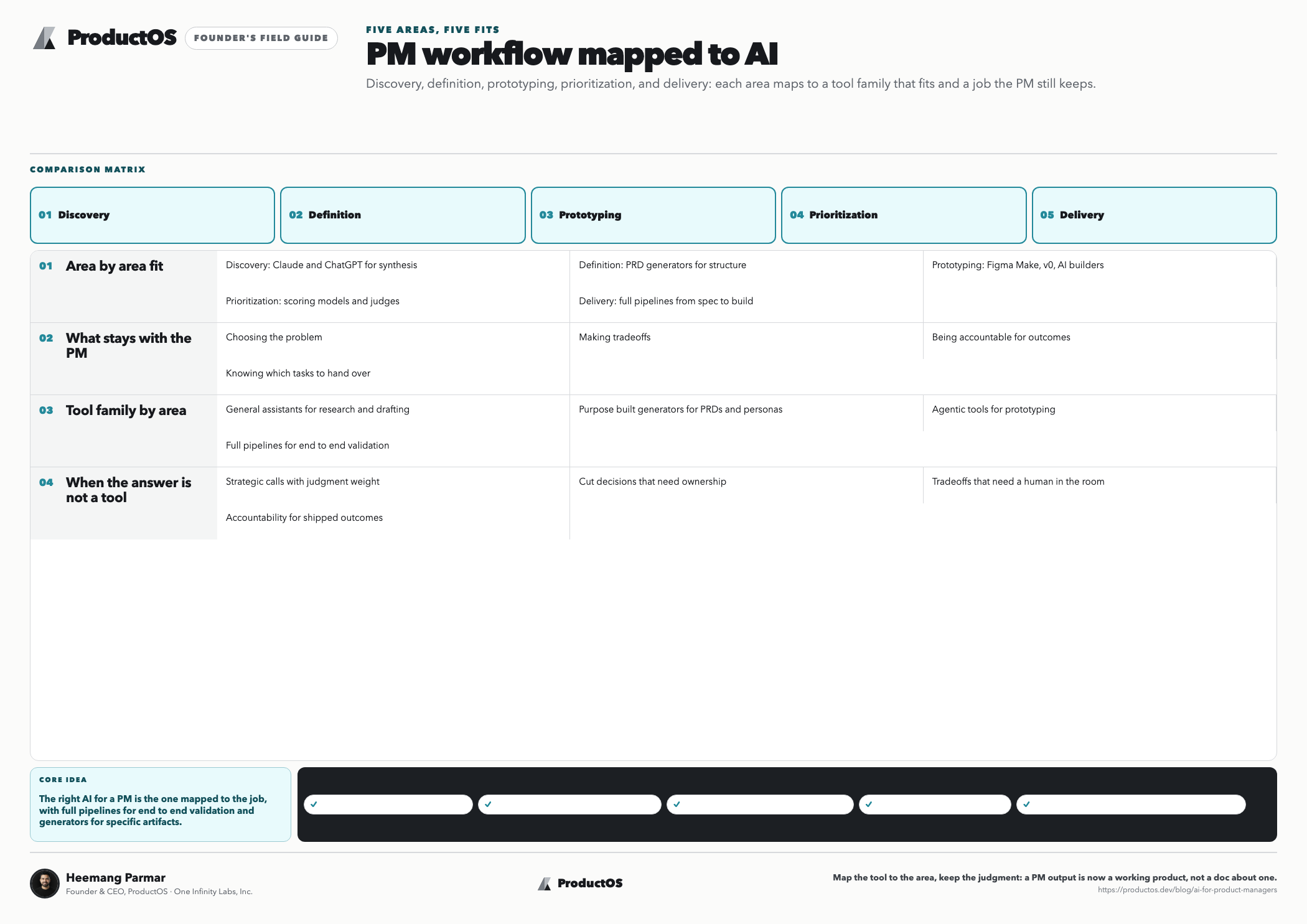
What can AI actually do for product managers?
AI reliably accelerates five areas of product work: research synthesis, document drafting, prototyping, data interrogation, and communication. It does not replace the judgment layer: choosing the problem, making trade-offs, and being accountable for outcomes. The practical skill is knowing which tasks to hand over and which to keep.
| Area of PM work | What AI does well | What stays with you |
|---|---|---|
| Discovery and research | Summarizing interviews, mining reviews, competitor scans, market sizing drafts | Choosing whom to study; judging which signal is real |
| Definition and specs | Drafting PRDs, user stories, acceptance criteria; spotting gaps | Problem framing, non-goals, the final call |
| Design and prototyping | Turning specs into clickable or working prototypes | Taste, brand judgment, what to test |
| Prioritization and metrics | Scoring backlogs, drafting metric trees, sanity-checking assumptions | The weights, the strategy, saying no |
| Communication | Release notes, stakeholder updates, meeting synthesis | The relationships and the hard conversations |
A useful rule: AI is strongest where the input is abundant and the output is structured. Fifty interview transcripts into a themed summary: excellent. A one-line idea into a strategy: theater. Feed it evidence and it multiplies you; feed it nothing and it multiplies nothing.
Which AI tools should product managers use in 2026?
Think in five categories rather than brand names: general assistants, single-purpose generators, agentic coding tools, AI app builders, and end-to-end product pipelines. Most working PMs use one tool from each of the first two categories daily, and one from the last three depending on how far toward shipping they want to go.
| Category | Examples | Best for | Honest limitation |
|---|---|---|---|
| General assistants | Claude, ChatGPT, Gemini | Research synthesis, drafting, thinking out loud | You manage all structure and context yourself |
| Single-purpose generators | PRD, persona, and user story tools | Fast, consistent artifacts with the structure built in | Each covers one artifact, not the workflow |
| Agentic coding tools | Cursor, Claude Code | Technical PMs working inside a real codebase | Assumes comfort with repositories and terminals |
| AI app builders | Lovable, Bolt, v0, Replit | Fast prototypes from prompts; UI exploration | Prompt-first, so quality depends on unwritten context |
| Product pipelines | ProductOS | Idea through research, PRD, design, build, and deploy in one flow | More process than a single-screen prototype tool |
Two-sided honesty, since we build one of these: if you already have engineers and just want faster UI experiments, a prompt-first builder like v0 or Lovable is a fine choice and quicker to first pixel. If you live in a codebase all day, Cursor or Claude Code will serve you better than any PM-specific tool.
The pipeline approach earns its keep when you need the whole chain, from research to a deployed product with a spec trail, without stitching five tools together yourself. For head-to-head breakdowns of the individual tools, see the comparison hub.
The free tools hub is a no-signup way to feel the difference between artifact generators and a full pipeline.
How do you choose the right category?
Five questions settle it faster than any feature comparison. Answer them before you subscribe to anything:
- What output do you need? A document points to a generator or assistant; a clickable demo points to an app builder; a deployable product points to a pipeline.
- Who has to trust the result? A prototype for a usability test has a lower bar than a build stakeholders will treat as the product.
- Do you have a spec, or just an idea? Prompt-first tools reward improvisation; spec-first tools reward the requirements you already wrote.
- Will engineers take it over later? If yes, code ownership and a clean handoff matter more than generation speed.
- How often will you do this? A one-off experiment justifies a free tool; a weekly habit justifies learning a pipeline.
How do product managers use AI for discovery and research?
The working pattern is: collect raw signal yourself, then use AI to compress, structure, and challenge it. Interview transcripts become themed findings. Competitor sites and reviews become positioning maps and complaint inventories. Market data becomes a sized, sourced draft you then verify. Synthesis gets fast; collection and judgment stay yours.
Concretely, the highest-yield discovery workflows are:
- Interview synthesis. Paste transcripts, ask for recurring pains ranked by frequency and severity, with verbatim quotes attached to each theme. The quotes keep you honest against the model’s tendency to over-smooth.
- Review mining. Run competitor reviews through the same treatment. Complaints about incumbent products are a roadmap written by someone else’s churned customers.
- Competitor scans. Ask for a feature and pricing comparison, then verify every cell before it reaches a deck. Models fill gaps confidently; treat the output as a draft to check, not a source. The full sizing-and-sourcing workflow is in our guide to AI market research.
- Persona drafting. Turn validated research into structured personas with a persona generator, so the format stays consistent across your team and the assumptions behind each persona are written down.
- Model pressure-testing. Put your assumptions into a lean canvas and ask the model to attack the weakest boxes. It is a better critic than inventor.
A concrete example of the compression: a PM with twelve interview transcripts, a folder of churn survey responses, and two competitors’ review pages can produce a themed findings document, with severity rankings and supporting quotes, in an afternoon.
The same synthesis used to take a week, which meant it often did not happen at all and teams shipped on the loudest anecdote instead.
Inside ProductOS this stage is run by a dedicated Research agent during Discover, so the findings land in the same project context the PRD is later written from. However you run it, the principle holds: discovery AI should end with evidence attached to claims, not with confident paragraphs.
How do product managers use AI to write PRDs and specs?
The reliable workflow is context brief, outline, sections, interrogation. You write four or five sentences of real context, approve a generated outline, generate section by section, then ask the model to attack its own draft for ambiguity and missing edge cases. Done this way, a day of drafting becomes an hour of editing.
The failure mode is skipping the first step. A one-line prompt produces a generic document with invented specifics, because the model fills every gap you leave.
The context brief, covering the problem, the user, the evidence, the constraints, and what is out of scope, is the highest-leverage text you write all day. The full method, including what a testable requirement line looks like, is in our complete guide to the product requirements document.
Tooling-wise, you can run this workflow in any chat assistant, or use a purpose-built AI PRD generator that bakes the structure and follow-up questions into the tool. Pair it with a user story generator to break the finished spec into consistent, criteria-backed stories.
What you should never delegate: the problem statement, the non-goals, and the success metric. Those are decisions, and the model does not carry your accountability.
Tips
- Keep a reusable context file about your product, users, and constraints, and paste it at the start of every AI session.
- Ask for verbatim quotes with every synthesis so you can spot-check the model against the source material.
- Approve an outline before generating prose; structure is cheap to fix, rewrites are not.
- Ask the model to argue against your draft before a stakeholder does it for you.
- Verify every number an AI puts in a table before it reaches a deck.
Can product managers now ship product, not just specs?
Yes, and this is the real headline of AI for product managers. Prototyping, front-end implementation, and deployment are now within a PM’s direct reach through AI builders and agent pipelines. The PM role tilts from writing about the product to shipping versions of it, with engineering focus shifting to the hard parts.
What this looks like in practice: instead of a spec plus a Figma link entering a quarterly queue, a PM produces a working prototype alongside the PRD. Everything downstream changes:
- Stakeholders react to software rather than documents.
- Usability tests run on the real flow instead of a simulation of it.
- Engineering receives a spec plus a reference implementation, which kills a whole class of misinterpretation.
- For internal tools and early-stage validation, the prototype is often good enough to be the product.
The broader methodology behind this shift, writing specs precise enough for agents to build from, has its own name: spec-driven development.
What does a PM shipping actually look like?
Take a small real case: an internal tool for the support team to tag and route tickets. Monday, the PM drafts a one-page PRD from the support lead’s complaints. Tuesday, an agent pipeline turns it into a working app with auth and a database, and the PM walks two support agents through it.
Wednesday is edits: renamed fields, a bulk action the agents asked for, one broken filter sent back to QA. Thursday the tool deploys and the support team is using it. No engineering ticket was ever filed, and the engineers stayed on the billing migration only they could do.
The caution is equally practical. A generated prototype is not a production system: auth, data integrity, accessibility, and security still need engineering rigor, whether that rigor comes from humans or from a pipeline with a real QA stage.
This is where approaches diverge. Prompt-first builders optimize for speed to first screen. A spec-first AI app builder optimizes for the build being traceable to requirements, so what ships matches what was decided. Choose by what you are risking: an experiment, or a system of record.
How do product managers use AI for prioritization and metrics?
AI helps most as a fast, tireless analyst: scoring backlogs against a framework, drafting metric trees, and challenging your estimates. It cannot set the strategy that makes prioritization meaningful. Use it to make the mechanical parts consistent and to expose where your inputs are guesses dressed as numbers.
Three workflows carry most of the value:
- Framework scoring. Run candidate features through RICE with a RICE calculator, then let the model argue against your reach and effort estimates; the argument is usually worth more than the score.
- Metric definition. Pick the single metric that best captures delivered value, then decompose it into the input metrics teams can actually move. Our guide to the north star metric covers how to choose one and 50 examples, and the free north star metric finder will draft candidates for your product.
- Assumption audits. Paste your roadmap and ask which items depend on unvalidated beliefs. Models are pleasantly ruthless at this.
A quick worked example of the scoring argument: a feature scored at reach 2,000 users per quarter, impact 1.5, confidence 80 percent, and effort 3 person-months yields a RICE score of 800. Asked to attack it, the model points out that reach assumed every user visits the settings page, which analytics puts at 40 percent. The corrected score, 320, drops the feature below two cheaper bets. Ten minutes, one reordering, no meeting.
The trap to avoid is laundering judgment through arithmetic. An AI-filled RICE table looks objective, but if the model guessed reach, the ranking is a guess with decimals. Keep humans on the inputs; let AI keep the process honest and fast.
What AI skills should product managers build?
Four skills compound: writing context briefs, decomposing work for agents, evaluating AI output against evidence, and understanding the connective tissue, meaning agents, tools, and protocols like MCP. None require writing code. Together they are the difference between a PM who uses AI tools and a PM whose output visibly changed.
- Context writing. The brief you give a model is the new spec-before-the-spec. PMs who write precise context get precise output; the skill transfers across every tool listed on this page.
- Task decomposition. Agents perform best on scoped, verifiable tasks. Breaking an ambiguous goal into checkable steps is product thinking applied to a new workforce.
- Evaluation. Knowing when output is wrong, and building the habit of verifying claims against your own data, matters more as generation gets cheaper. Treat unverified AI output like an unverified metric.
- Systems literacy. Understand what an AI agent is, how tools connect to your stack through the Model Context Protocol, and roughly how context windows constrain what a model can hold. You do not need to build these systems, but you do need to specify work for them, and specification quality is now a visible PM skill in the same way deck quality once was.
How does ProductOS fit a product manager’s workflow?
ProductOS runs the whole arc described above as one pipeline. Ten specialized agents, including Research, PRD, Architect, Design, Fullstack Builder, QA, and Deploy, share a single project context across five stages: Ideate, Discover, Define, Design, Develop. The PRD is written section by section behind an outline gate, so you approve structure before prose.
Downstream, the build runs in an isolated cloud sandbox with a live preview. QA verifies flows in real headless Chromium with a pass, partial, or fail verdict. Deploy preflights the build and pushes code to your own GitHub, self-fixing up to three times if something breaks.
Model routing is BYOK and multi-provider, so no single model is hardcoded into your workflow. The five-stage pipeline page walks through each stage. The practical effect for a PM is simple: the document you own and the product that ships are finally the same thread.
Frequently asked questions
What are the best AI tools for product managers?
The best stack maps to the job: a general assistant (Claude, ChatGPT, or Gemini) for synthesis and drafting, purpose-built generators for PRDs, personas, and prioritization, and a build tool for prototyping, whether that is a prompt-first app builder or a full agent pipeline. Most PMs need one tool per category, not ten overlapping subscriptions. Start from the workflow you want to speed up, then pick the category.
Will AI replace product managers?
AI replaces tasks, not the accountability. Drafting, synthesis, scoring, and prototyping are increasingly automated; choosing the problem, making trade-offs, aligning people, and owning outcomes are not. The realistic risk is compression: teams need fewer people for the same document output, so the PMs who thrive are those who convert the freed time into shipped validation rather than more documents.
How do product managers use AI day to day?
The common daily loop is synthesis in the morning (summarize feedback, tickets, and analytics into themes), drafting in the middle (PRD sections, stories, stakeholder updates), and checking at the end (asking the model to attack estimates and find gaps). PMs further along add prototyping: turning a spec into a working flow to test instead of a slide to present.
Do product managers need to learn to code for AI tools?
No. The high-leverage skills are context writing, task decomposition, and evaluation, all of which are language and judgment skills. Technical fluency helps at the margins, and tools like Cursor reward it, but agent pipelines and app builders are operated through specs and reviews, not code. A PM who writes precise requirements gets more from AI than a PM who writes loose prompts in any tool.
What is the difference between an AI app builder and an AI product pipeline?
An app builder turns prompts into working screens fast; you supply the product thinking around it. A pipeline runs the product process itself: research, a gated PRD, architecture, design, build, QA, and deployment, with each stage feeding the next from shared context. Builders suit quick experiments and UI exploration. Pipelines suit builds where you want the shipped product traceable to decisions.
Can AI do product discovery?
AI can compress and structure discovery, not perform it. It synthesizes interviews, mines reviews, and drafts market maps far faster than a human, but it cannot sit with a user, notice what they did not say, or decide which signal changes the roadmap. Teams that let AI generate discovery from nothing get plausible fiction. Collect real signal, then let AI multiply it.
How does ProductOS help product managers specifically?
It gives a PM the whole chain in one place: a Research agent for discovery, a PRD agent that drafts behind an outline gate, design and build agents that implement from the spec, and QA plus Deploy stages that verify and ship to your own GitHub. The PM operates the pipeline through approvals and edits, which is the existing skill set, applied to shipping rather than documenting.
The tools will keep churning; the shift is durable. Product managers who treat AI as a typing accelerator will write more documents faster. The ones who treat it as a build capability will ship. If the second group sounds like where you want to be, see how product managers use ProductOS to go from idea to a deployed product on one thread of context.
CS engineer and IIM Lucknow MBA. Built products across enterprise and AI for 10+ years. Founded ProductOS to give every PM and founder the leverage of a full product team. Writes about AI product development, PRDs, and building with agents.